> ## Documentation Index
> Fetch the complete documentation index at: https://docs.replit.com/llms.txt
> Use this file to discover all available pages before exploring further.
# Explore with different models
> Switch the model behind Replit Design to explore different directions: each model brings its own design sensibility and frontend strengths.
Suggestions explore directions with the same designer; switching models changes the designer. Each model has its own design sensibility and frontend strengths, so the same brief can land somewhere new with a different model behind it.
## Switch the model
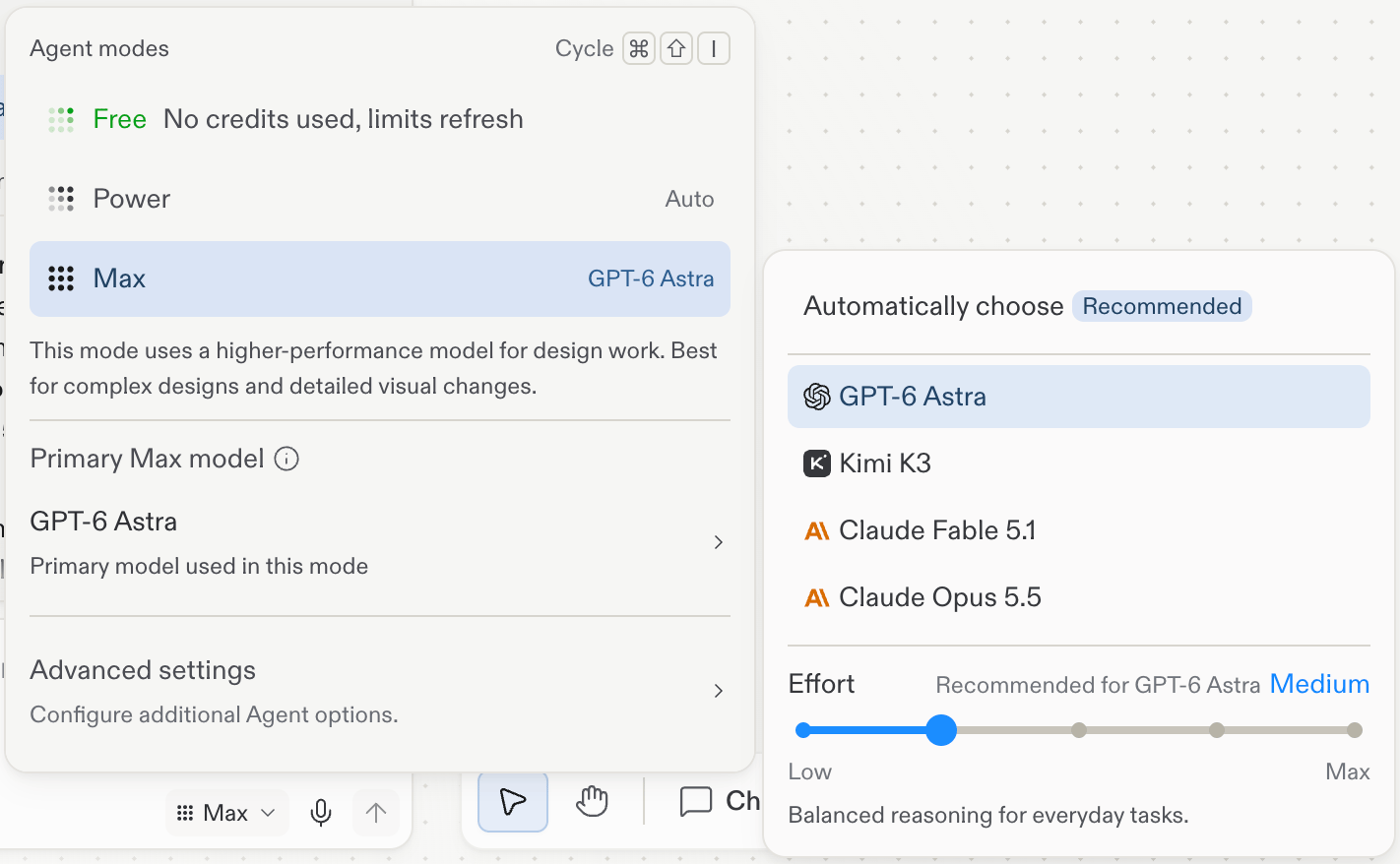
Open the mode selector in the chat composer (it shows the current mode, such as **Power**), then select **Primary model** and pick from the list.
Open the mode selector in the chat composer (it shows the current mode, such as **Max**). Select the primary model row, which is labeled with the mode name (such as **Primary Max model**), then pick a model from the list or keep **Automatically choose**.
 The model lineup changes as new models ship. Check the in-product menu for what your account can use today.
Two more controls live in the same popover:
* **Mode** (Free Mode, Power Mode, or Max Mode): the balance between speed, cost, and capability. Max Mode uses a higher-performance model for design work, best for complex designs and detailed visual changes. See [Agent modes](/features/agent/agent-modes) for the full reference.
* **Effort**: how much reasoning the model spends per response, from Low (fastest) to Max. Each model shows its recommended setting.
## Explore across models
Model switching is another axis of exploration, alongside [suggestions](/design/explore-suggestions):
* **Same brief, different designer**: generate a frame, switch the model, and send the same prompt again. Both directions land as frames on the canvas, so you can compare them side by side.
* **Match the model to the work**: use the recommended model for most work, and switch when a design calls for a different sensibility, or when you want a second opinion on a direction you're unsure about.
* **Switch anytime**: the model applies to your next message, so you can change it mid-project without losing anything on the canvas.
## Next steps
* [Explore](/design/explore): the full exploration toolkit at a glance.
* [Explore suggestions](/design/explore-suggestions): one-click directions proposed from your selected frame.
The model lineup changes as new models ship. Check the in-product menu for what your account can use today.
Two more controls live in the same popover:
* **Mode** (Free Mode, Power Mode, or Max Mode): the balance between speed, cost, and capability. Max Mode uses a higher-performance model for design work, best for complex designs and detailed visual changes. See [Agent modes](/features/agent/agent-modes) for the full reference.
* **Effort**: how much reasoning the model spends per response, from Low (fastest) to Max. Each model shows its recommended setting.
## Explore across models
Model switching is another axis of exploration, alongside [suggestions](/design/explore-suggestions):
* **Same brief, different designer**: generate a frame, switch the model, and send the same prompt again. Both directions land as frames on the canvas, so you can compare them side by side.
* **Match the model to the work**: use the recommended model for most work, and switch when a design calls for a different sensibility, or when you want a second opinion on a direction you're unsure about.
* **Switch anytime**: the model applies to your next message, so you can change it mid-project without losing anything on the canvas.
## Next steps
* [Explore](/design/explore): the full exploration toolkit at a glance.
* [Explore suggestions](/design/explore-suggestions): one-click directions proposed from your selected frame.