;
};
export const ChatExampleGrid = ({hasVisuals, children}) => {
return
{children}
;
};
The Project Security Center is the central place to find and fix security and privacy vulnerabilities in a Replit App. In your project's **Tools** pane, select **Security Center** to run scans, review findings, and send accepted issues to Agent for remediation.
New to dependency security? See [Security
concepts](/features/security/concepts) for definitions of CVE, SBOM, exposure,
Fix with Agent, Republish, and Auto-Protect.
## Choose a security scan
Compare [security scan levels](/features/security/security-scan-levels) to see what Levels 1, 2, and 3 check.
Choose the scan that matches the type of review you need:
Use an Agent security scan for the normal code-review workflow. Security
Agent audits your codebase, reports findings, and helps you fix them.
Use a Level 3 scan when you also need a black-box pen test of the running
app. Level 3 runs that test alongside a source-code review.
Both paths report findings in **Security Center**. Agent security scans are available to paid Replit builders.
## Automatic dependency scans
Automatic dependency scans check project packages against public vulnerability records. These scans are free and run automatically. When a new Common Vulnerabilities and Exposures (CVE) entry is disclosed, Replit checks it against your project's dependencies and surfaces matches in the **Security** pane without requiring a manual rescan.
Dependency scanning supports Node.js/npm, Python, Go, Rust, PHP, and Ruby.
Automatic dependency fixing is currently focused on Node.js/npm.
### Auto-Protect
Auto-Protect extends automatic dependency scanning. When Replit detects a matching vulnerability, Agent prepares and tests a patch and emails you a direct link. The patch remains pending in the **Security** pane for your review. After you apply it, republish the app so the production version includes the fix.
Auto-Protect covers dependency CVEs only. Use an [Agent security scan](/features/security/agent-security-scans) to review application code.
Both Auto-Protect settings are off by default:
A Workspace admin goes to **Settings** > **Account** > **Advanced**, then
selects the minimum severity (low, medium, high, or critical) at which
Replit should prepare remediations.
Go to **Settings** > **Personalization** > **Email Notifications**, then
select the minimum severity at which you want to receive notifications.
For each new vulnerability, Replit sends at most one email per Workspace that summarizes all affected projects. Select **Go to Task** to inspect an Agent-prepared patch before applying it. After you apply the patch, the vulnerability appears as **pending republish** until you publish a new version.
Agent-prepared remediations are billed like other Agent work, including when
Auto-Protect prepares them proactively.
## Review findings
Security results appear in the **Security** pane and are grouped by severity:
| Severity | Guidance |
| - | - |
| Critical | Immediate risks that you should address before publishing |
| High | Serious issues that could be exploited under certain conditions |
| Medium | Potential risks that are less likely to be exploitable |
| Low / Informational | Minor issues and best-practice recommendations |
Review each finding before accepting, revising, or dismissing it. Send accepted issues to Agent for remediation, then rerun the relevant scan after applying fixes.
## Security checks during development and publishing
### Security scan while you build
As you build with Agent, Replit automatically reviews the files Agent changes for common insecure patterns and hardcoded secrets. This is an early, lightweight check in the Agent workflow rather than a full codebase review. Its results do not appear as a separate report in the **Security** pane.
### Publish checks
Replit also runs a security scan before publishing. The **Block publishing of critical vulnerabilities** setting determines what happens when the scan finds a critical issue:
* **On**: Publishing is blocked until the issue is resolved or dismissed.
* **Off**: Publishing proceeds, and the finding remains available for review.
Enterprise organizations can require this setting for every app.
These checks complement, rather than replace, a full [Agent security scan](/features/security/agent-security-scans) or [Level 3 scan](/features/security/black-box-pen-tests).
## Next steps
* Follow the [Agent security scan workflow](/features/security/agent-security-scans).
* Learn how to run [black-box pen tests with Level 3](/features/security/black-box-pen-tests).
* Learn more about [Publishing](/learn/projects-and-artifacts/replit-deployments).
* Read [How Replit secures AI-generated code](https://blog.replit.com/securing-ai-generated-code).
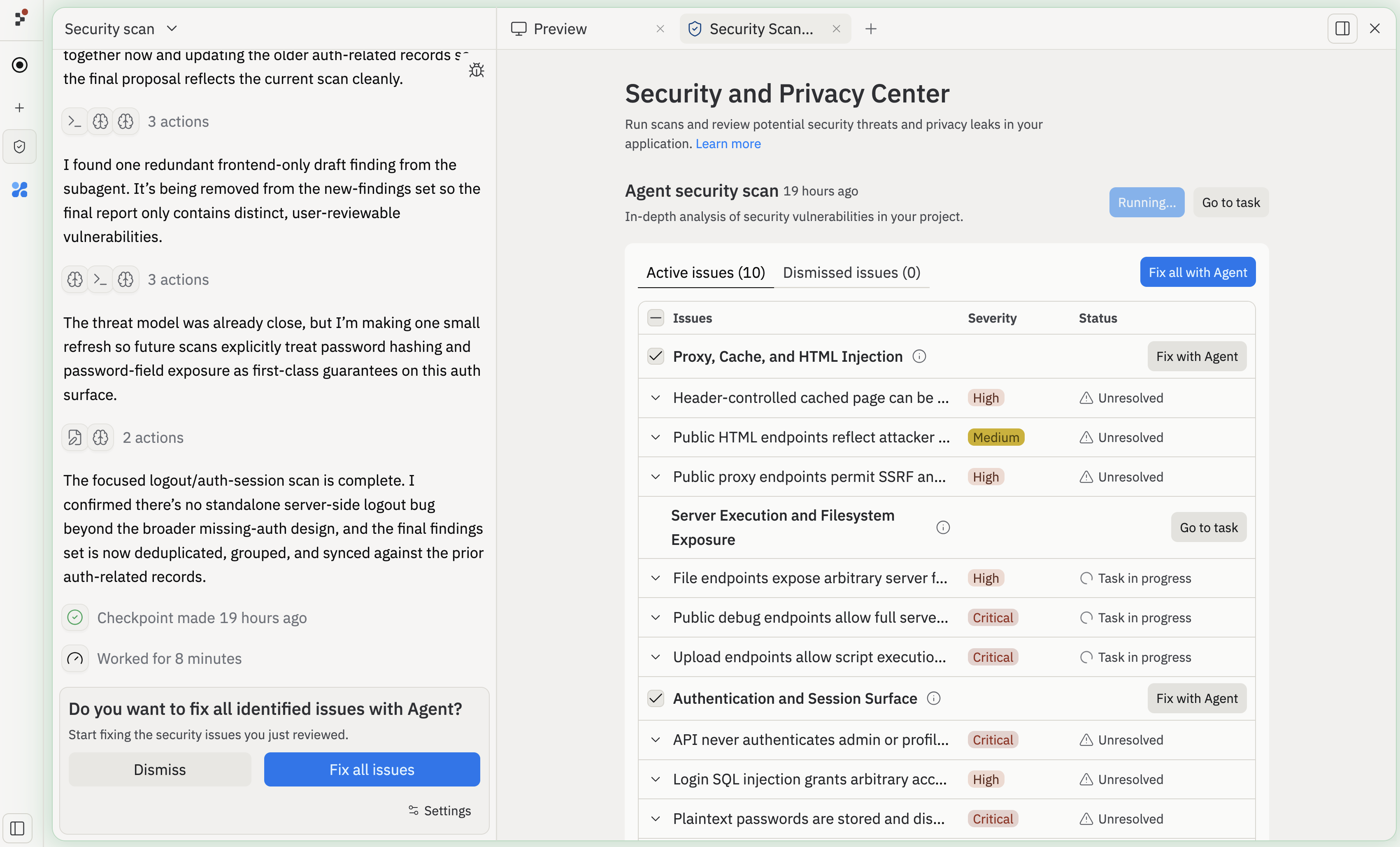 The Project Security Center is the central place to find and fix security and privacy vulnerabilities in a Replit App. In your project's **Tools** pane, select **Security Center** to run scans, review findings, and send accepted issues to Agent for remediation.
 ### Auto-Protect
Auto-Protect extends automatic dependency scanning. When Replit detects a matching vulnerability, Agent prepares and tests a patch and emails you a direct link. The patch remains pending in the **Security** pane for your review. After you apply it, republish the app so the production version includes the fix.
Auto-Protect covers dependency CVEs only. Use an [Agent security scan](/features/security/agent-security-scans) to review application code.
Both Auto-Protect settings are off by default:
### Auto-Protect
Auto-Protect extends automatic dependency scanning. When Replit detects a matching vulnerability, Agent prepares and tests a patch and emails you a direct link. The patch remains pending in the **Security** pane for your review. After you apply it, republish the app so the production version includes the fix.
Auto-Protect covers dependency CVEs only. Use an [Agent security scan](/features/security/agent-security-scans) to review application code.
Both Auto-Protect settings are off by default: